
Tous
FlightFeeder Antenna Replacement
Due to a defective batch of antennas shipped in late 2014 and 2015, it is necessary that you replace your antenna for optimal operation of your FlightFeeder.
| 1FlightFeeder Antenna Kit |
Verify antenna replacement kit contents
 |
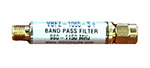
The filter is designed to optimize the ADS-B signal that the FlightFeeder receives.
 |
| 2L'installation de l'antenne |
- Vous voudrez installer l'antenne extérieure dans un emplacement optimal, aussi haut que possible et éloigné d'obstacles qui peuvent bloquer les signaux des avions. Les obstacles peuvent comprendre d'autre bâtiments, des arbres et des élévations de terrain. Vous voudrez installer l'antenne à l'extérieur, mais le FlightFeeder lui même devrait rester à l'intérieur.
- Fixer fermement les deux rondelles comme cela est montré avec les deux flèches du bas.
- Fixez fermement l'écrou montré avec la flèche du haut.
- Répétez cela pour chacun des quatre points d'attache et resserrez chaque point au diamètre de votre mât de fixation comme cela est montré sur la photo ci-dessous.
- Fixer l'antenne en la faisant glisser sur votre mât de fixation.
- Les câbles coaxiaux sont épais et vous devriez éviter de les plier afin d'empêcher une perte de signal.
- Connectez le câble coaxial à l'antenne (comme cela est montré par le point sur la photo ci-dessous) et à l'autre extrémité au FlightFeeder.


| 3Next Steps & More Information |
The coverage of your receiver should now be significantly improved. You can also view the receiver status through our ADS-B statistics portal.
We thank you for joining the FlightAware ADS-B network and remind you to contact us with any questions or comments.
